Join your center as a staff member
Cubby is free for staff. Your director adds you and Cubby sends you an invite by email.
-
Download Cubby
Get Cubby from the App Store on iPhone or iPad, or from Google Play on Android.
-
Open your invite on your phone
Find the invite email and tap the link. Cubby opens to a welcome screen with your name and your center's name.
No link, or it won't open? Open Cubby, tap I have an invite on the sign-in screen, and enter your email and the 6-digit code from your invite email.
-
Create a password
Choose a password and you're in. Cubby opens on the Today tab.
Your Today tab
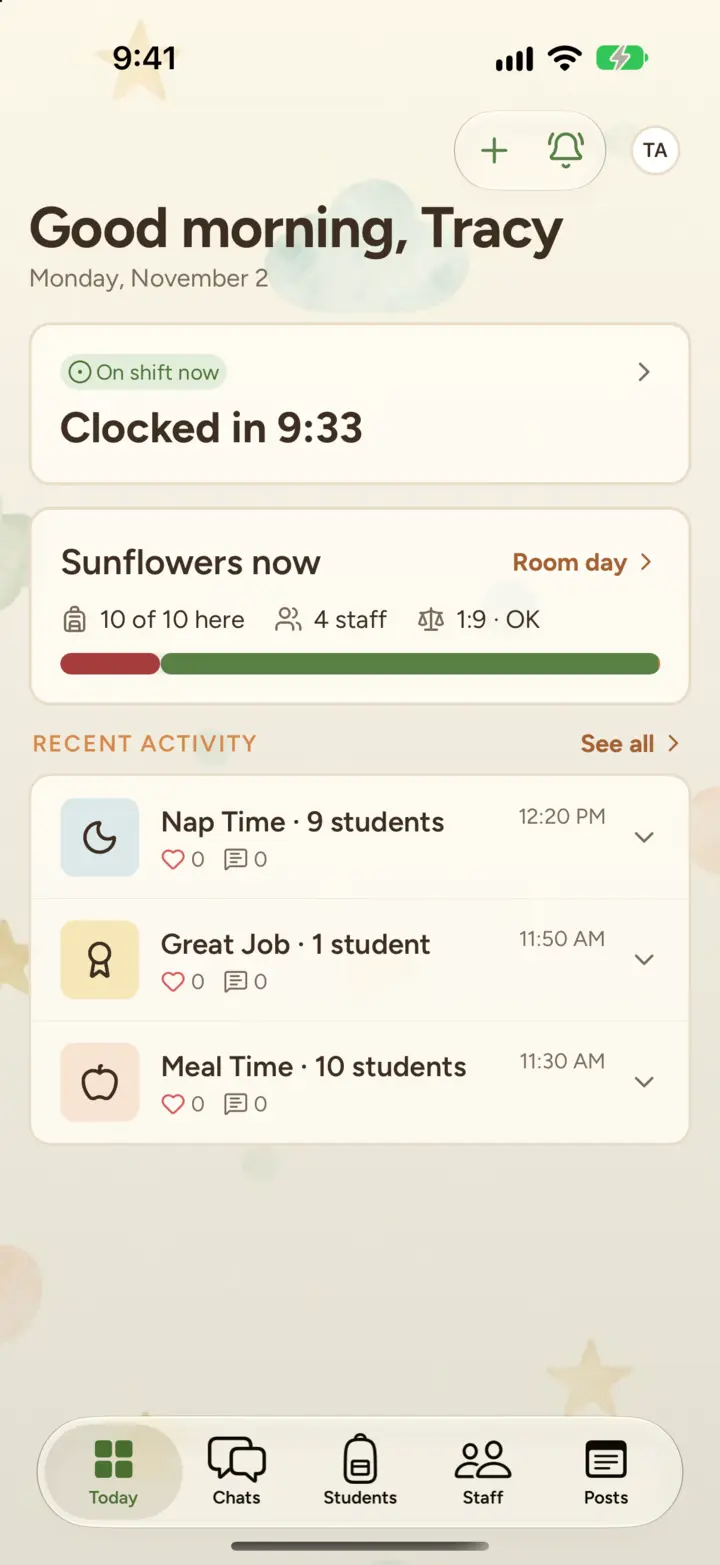
- Your shift. Whether you're on shift now, or when your next shift is. Tap it to see your schedule.
- Your room right now. How many children and staff are here, and what's next. Tap Room day for the whole day.
- Waiting on you. Comments and messages you haven't read yet.
- Recent activity in your room.
To log a nap, a meal or a photo, tap + at the top (Log activity on iPad). The tabs along the bottom are Today, Chats, Students, Staff and Posts.
Clocking in
You clock in and out at your center's kiosk with a 4-digit PIN. Check in and out at the kiosk
Didn't get an invite?
Ask your director to send one, or to check they have the right email address. My invite link isn't working
Still stuck?
Email hello@thecubbyapp.com and we'll help. For questions about your child, schedule or bill, contact your center.